Agent Framework
This document is a top-down walkthrough of the Dragon AI Agent Framework for developers who will maintain and extend it. It starts with the big picture — what the framework does and how the code is organized — then traces a single request through the system end-to-end, and finally drills into each subsystem in the order the request touches them.
For the Python API reference, see Agent Framework. For a hands-on tutorial, see Dragon AI Agent Framework — User Guide.
What This Framework Does
The Dragon AI Agent Framework is a multi-agent orchestration system for executing LLM-powered DAG workflows on HPC clusters. You define a pipeline of named agents, each with a role, tools, and an LLM backend. The framework:
Launches each agent in its own Dragon process (optionally on a specific compute node).
Wires them into a directed acyclic graph (DAG) so upstream results automatically flow into downstream agents’ context.
Dispatches user tasks through the DAG via Dragon Batch, with Event-based completion signaling (no polling).
Stores all shared state in a distributed dictionary (DDict) — agents are stateless; the DDict is the single source of truth.
Provides optional subsystems for human-in-the-loop approval, real-time tracing, memory management, and MCP tool servers.
The key architectural bet is: zero per-task state inside agents, all state in
DDict, all IPC via Queue, all completion signaling via Event. This makes
agents restartable in theory and concurrent in practice — a single agent process
can serve multiple tasks simultaneously via asyncio.
Why Dragon on HPC
Common agent frameworks rely on HTTP/REST for inter-agent communication, external databases (Redis, PostgreSQL) for shared state, and message brokers or polling loops for coordination. This works on commodity infrastructure but leaves HPC clusters severely underutilized.
Data sharing without external services.
All shared state lives in a DDict — a distributed
key-value store backed by Dragon managed memory. On-node reads are direct memory
loads; cross-node reads use RDMA. There is no Redis, no PostgreSQL, no etcd to
deploy or monitor. The DDict scales horizontally with managers_per_node and
n_nodes, partitioning the keyspace across hundreds of parallel
read/write endpoints. By contrast, every state access in typical agent
frameworks is a network round-trip through an external database client.
Zero-copy, RDMA-based IPC.
All inter-process communication — task dispatch, LLM request/response, HITL
approval — flows through Dragon Queue.
On-node transfers use shared-memory copy (no kernel transitions, no TCP); cross-node
transfers use RDMA, bypassing the kernel network stack entirely. Completion
signaling uses Event — a single blocking
wait() that unblocks in microseconds when the producer calls set(), with
zero polling. HTTP-based frameworks pay TCP setup, TLS, JSON serialization, and
kernel buffer copies on every message.
Concurrent task processing within each agent.
Each agent runs as a separate Dragon-managed OS process with its own Python
interpreter and GIL. Within that process, incoming tasks are dispatched as
concurrent asyncio.Task instances — a single agent can serve multiple
in-flight LLM tool-calling loops simultaneously. All blocking Dragon calls are
wrapped with asyncio.to_thread(), so the event loop stays free during Queue
and DDict operations. This gives both inter-agent parallelism (separate
processes, no GIL contention) and intra-agent concurrency (asyncio task
fan-out). Most existing frameworks run agents as coroutines or threads in a
single process, where the GIL serializes all Python execution and a segfault
in one agent crashes everything.
Scalability from laptop to supercomputer.
The framework scales without architectural changes: add nodes and place agents
with Policy(host_name=...), scale inference with tensor/pipeline parallelism
across GPUs, and spread DDict state across more managers. DAG branches execute
in parallel via Dragon Batch across as many nodes as the graph width allows.
The entire stack — agents, inference, state, coordination — runs inside a single
dragon invocation with zero external infrastructure.
Source Code Layout
All agent framework code lives under src/dragon/ai/agent/. The inference
backend is a sibling package at src/dragon/ai/inference/.
agent/
├── __init__.py
├── communication/         # Wire protocol between orchestrator ↔ agent
│   ├── dragon_comm.py     #   DragonQueueCommunication (Queue-based impl)
│   ├── message.py         #   Message, TaskMessage, ShutdownMessage
│   └── protocol.py        #   CommunicationProtocol (abstract base)
├── config/                # All configuration dataclasses
│   ├── agent_config.py    #   AgentConfig
│   ├── ddict_keys.py      #   Key-format constants for DDict
│   ├── dispatch.py        #   DispatchHeader, TaskResult, TaskStatus
│   ├── memory_config.py   #   MemoryConfig, MemoryStrategy enum
│   └── pipeline.py        #   PipelineNode, Pipeline, OrchestratorConfig
├── core/                  # Process lifecycle and dispatch
│   ├── base.py            #   DragonAgent (the agent class)
│   ├── batch_dispatch.py  #   make_dispatcher_fn() — Dragon Batch bridge
│   └── sub_agent.py       #   create_sub_agent() entry point, listen loop
├── ddict/                 # Scoreboard DDict access
│   └── accessor.py        #   DDictAccessor (typed read/write wrapper)
├── hitl/                  # Human-in-the-loop subsystem
│   ├── approval.py        #   HumanApprovalGate (agent-side)
│   ├── client.py          #   HITLClient (external approver)
│   ├── models.py          #   HumanApprovalRequest/Response Pydantic models
│   ├── tcp_bridge.py      #   HITLTcpBridge (Dragon Queue ↔ TCP)
│   ├── tcp_client.py      #   HITLTcpClient (network client)
│   └── terminal.py        #   Terminal-based approval UI
├── memory/                # Context window management
│   └── context_manager.py #   ContextWindowManager (truncation/summarize)
├── observability/         # Tracing and visualization
│   ├── ddict_tracer.py    #   DictTracingProcessor (DDict-backed spans)
│   ├── tcp_bridge.py      #   TraceTcpBridge (DDict → TCP stream)
│   ├── trace_interactive.py # Curses-based live viewer
│   ├── trace_protocol.py  #   MsgType enum, message formats
│   ├── trace_renderer.py  #   Gantt-bar rendering logic
│   ├── trace_report.py    #   Offline report generator
│   ├── trace_state.py     #   TraceState (viewer-side state machine)
│   ├── tracer.py          #   TracingProcessor base, trace_span context mgr
│   └── viewer.py          #   TraceViewer (TCP receiver + renderer)
├── orchestrator/          # Top-level DAG controller
│   └── orchestrator.py    #   DAGOrchestrator
├── reasoning/             # LLM interaction loop
│   ├── event_writer.py    #   Per-event DDict write helpers
│   ├── response_parser.py #   JSON parse + truncation repair
│   └── tool_dispatcher.py #   ToolDispatcher (the agentic loop)
├── tools/                 # Tool abstraction layer
│   ├── base.py            #   Tool (abstract base)
│   ├── function_tool.py   #   FunctionTool (wraps a callable)
│   ├── mcp_tool.py        #   MCPServerClient (MCP protocol bridge)
│   └── registry.py        #   ToolRegistry (name → Tool map)
└── utils/                 # Cross-cutting utilities
    ├── ansi.py            #   ANSI color helpers
    ├── errors.py          #   AgentError hierarchy
    └── logging.py         #   get_agent_logger, Dragon logging setup
When you need to find something:
“Where does an agent process start?” →
core/sub_agent.py:create_sub_agent“Where is the LLM called?” →
reasoning/tool_dispatcher.py:ToolDispatcher.chat“Where does the DAG get built?” →
orchestrator/orchestrator.py:DAGOrchestrator._build_dag“Where are DDict keys defined?” →
config/ddict_keys.py“Where does task dispatch happen?” →
core/batch_dispatch.py:make_dispatcher_fn
Dragon import concentration. Only 8 of 53 source files contain
dragon.* imports. The remaining 45 files are pure Python that operate on
abstractions (DDictAccessor, CommunicationProtocol, ToolDispatcher,
etc.) whose Dragon-specific implementations are injected at construction time.
File |
Dragon primitives |
|---|---|
|
DDict (create/serialize/destroy), Queue (read agent handles, create HITL
queue), Batch ( |
|
DDict (attach/detach), Queue ( |
|
DDict (attach/detach) |
|
Queue (via |
|
Queue (create/serialize/ |
|
Queue (type annotation for |
|
Queue (create per-request response queue, |
|
|
Runtime Architecture
The following diagram shows how the framework components connect at runtime:
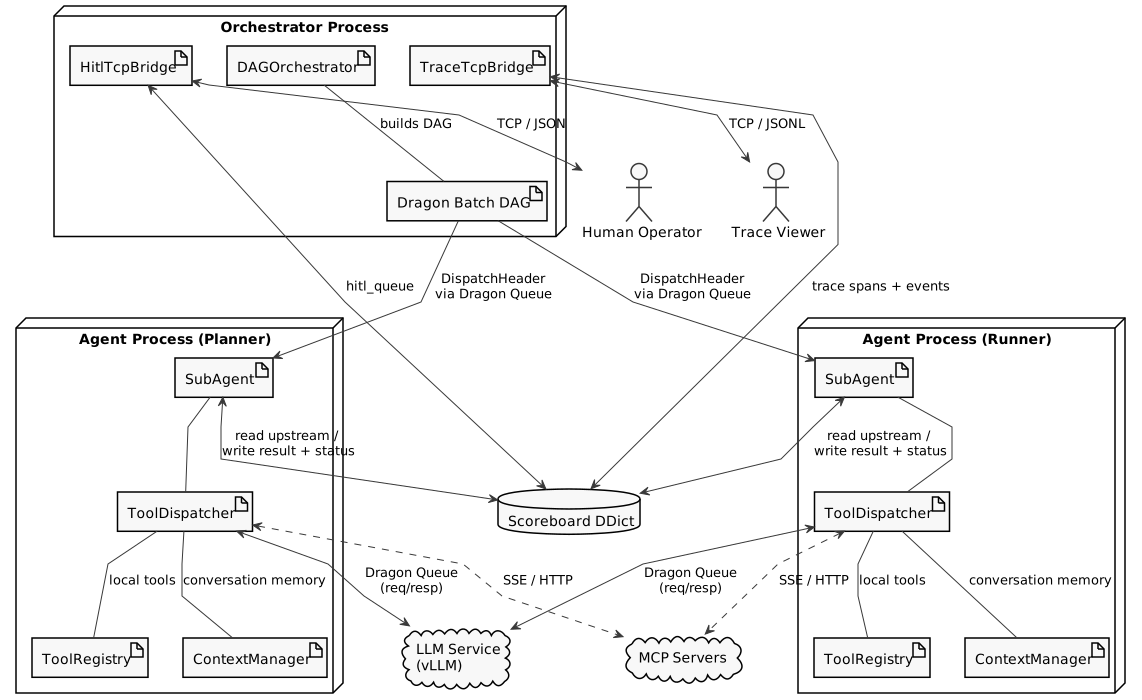
Fig. 39 Dragon AI Agent Framework — Runtime Architecture
The diagram illustrates:
Orchestrator Process: Coordinates the DAG, manages the Scoreboard DDict, and bridges for human-in-the-loop and tracing.
Agent Processes: Multiple agents (Planner, Runner) run concurrently, each with a ToolDispatcher (handles LLM calls and tool execution) and ToolRegistry (local tool definitions).
Scoreboard DDict: The single source of truth for all task state, shared across processes via Dragon’s distributed dictionary.
IPC via Dragon Queue: Agents receive DispatchHeaders via Dragon Queue, send requests to the shared inference backend (vLLM) via Dragon Queue, and access MCP servers via HTTP/SSE.
LLM Service and MCP Servers: External services consumed by agents.
HITL and Trace Bridges: TCP gateways for human approval and real-time observability.
Dragon Primitives Used
The framework is built on a small set of Dragon primitives. Understanding which primitives are used is key to understanding the architecture.
Primitive |
Module |
Role in Agent Framework |
|---|---|---|
|
Agent input queues, LLM inference request/response, HITL request/response, inter-process reply queues. The primary IPC mechanism. |
|
|
Scoreboard — all task state (status, results, global state, tool history, trace spans, HITL queue handle). Created per pipeline run. |
|
|
Completion signaling — one Event per dispatch. Dispatcher blocks on
|
|
|
DAG execution — each pipeline node is registered as a
|
|
|
|
Wraps a Dragon Queue as an LLM client. Request/response pattern: put prompt on inference queue, block on per-request response queue. |
|
|
Three-tier logging (stderr, dragon-file, actor-file). Uses
|
End-to-End Request Flow
This section traces one user request through the entire system, from the
moment the caller invokes orchestrator.run() to the moment the final result
is returned. Read this section first to build a mental model of how all the
pieces fit together; the subsequent sections drill into each component.
Caller                 Orchestrator              Dragon Batch           Dispatcher Closure        Agent Process
  │                        │                         │                       │                       │
  │  run(user_input)       │                         │                       │                       │
  │───────────────────────>│                         │                       │                       │
  │                        │  write user_input       │                       │                       │
  │                        │  to DDict               │                       │                       │
  │                        │                         │                       │                       │
  │                        │  _build_dag()           │                       │                       │
  │                        │─────────────────────────>│  batch.function(fn)  │                       │
  │                        │                         │                       │                       │
  │                        │                         │  invoke fn(upstream)  │                       │
  │                        │                         │──────────────────────>│                       │
  │                        │                         │                       │  DDict.attach()       │
  │                        │                         │                       │  Event()              │
  │                        │                         │                       │  queue.put(msg)       │
  │                        │                         │                       │──────────────────────>│
  │                        │                         │                       │                       │  DDict.attach()
  │                        │                         │                       │                       │  read upstream
  │                        │                         │                       │                       │  ToolDispatcher.chat()
  │                        │                         │                       │                       │    ├─ LLM call
  │                        │                         │                       │                       │    ├─ tool exec
  │                        │                         │                       │                       │    └─ final answer
  │                        │                         │                       │                       │  write result to DDict
  │                        │                         │                       │  event.wait() ◄───────│  event.set()
  │                        │                         │                       │  read status          │  DDict.detach()
  │                        │                         │                       │  return TaskResult    │
  │                        │                         │  <────────────────────│                       │
  │                        │                         │  (fans to downstream) │                       │
  │                        │                         │                       │                       │
  │                        │  task_handle.get()      │                       │                       │
  │                        │<────────────────────────│                       │                       │
  │  final result          │                         │                       │                       │
  │<───────────────────────│                         │                       │                       │
Step by step:
Caller invokes
orchestrator.run(user_input, batch).Orchestrator writes the user prompt to DDict (
USER_INPUT_KEY) and seeds the global state with{"agent_id": "user", "answer": user_input}.Orchestrator calls
_build_dag()which registers eachPipelineNodeas a Dragon Batch function. For agent-backed nodes, the function is a dispatcher closure frommake_dispatcher_fn(). For plain-function nodes, it’s the user-supplied callable.Dragon Batch resolves execution order from the DAG dependencies and invokes each dispatcher closure with upstream
TaskResultobjects.Dispatcher closure (runs in Dragon Batch, no event loop): a.
DDict.attach(serialized_ddict)b. Creates a completionEvent()c. Builds aDispatchHeader(metadata only — no data payload) d.agent_queue.put(Message(header=header))— sends via cloudpickle e.completion_event.wait()— blocks until the agent signals f. Reads status from DDict, returnsTaskResultg.event.destroy(),ddict.detach()infinallyAgent process (
SubAgent._handle_message(), runs asasyncio.Task): a.DDict.attach(header.serialized_ddict)b. Reads upstream results from DDict (targeted reads for parent agents) c. RunsToolDispatcher.chat()— the multi-turn LLM tool-calling loop d. Writes result and status to DDict e.event.set()— unblocks the dispatcher instantly f.ddict.detach()infinallyOrchestrator calls
task_handle.get()on terminal nodes to collect final results.
The rest of this document explains each component in the order they appear in this flow.
The Orchestrator
The DAGOrchestrator (orchestrator/orchestrator.py) is the request-side
entry point. It owns the full lifecycle of the shared
DDict and assumes all agents are already running
persistently.
Construction and Initialization
On __init__, the orchestrator:
Collects agent input queues from
OrchestratorConfig.agents— eachAgentConfig.input_queueis aQueuehandle that the agent process created and shared back via a reply queue during startup. These are stored in_agent_handles[agent_id].Cross-validates the pipeline: every agent-backed node must reference an
agent_idpresent in the config. (Note:Pipeline.__post_init__performs additional validation — Kahn’s algorithm topological sort that rejects cycles, plus duplicateagent_idand undefineddepends_onchecks.)Calls
_init_infrastructure(), which:Creates the shared
DDictwith configurable kwargs (managers_per_node,n_nodes,total_mem, etc.) and immediately serializes it (ddict.serialize()→ bytes descriptor).If any agent declares an
approval_filter, creates a HITLQueue, stores it in the DDict underHITL_QUEUE_KEY, and starts aHitlTcpBridgedaemon thread that binds a TCP server socket on a free port.If
OrchestratorConfig.tracing=True, starts aTraceTcpBridgedaemon thread for real-time span streaming.
After
__init__returns,hitl_address,trace_address, andserialized_ddictare all available — callers can print connection instructions before callingrun().
Running a Pipeline
run(user_input, batch) executes the DAG:
Writes the user prompt to the DDict (
USER_INPUT_KEY) and seeds the global state list with{"agent_id": "user", "answer": user_input}.Calls
_build_dag()to register eachPipelineNodeas a Dragon Batch task viabatch.function(fn, *dep_keys). For agent-backed nodes,fnis a dispatcher closure built bymake_dispatcher_fn()(see The Dispatch Layer). For plain-function nodes,fnis the user-supplied callable. Task-typed positional arguments wire dependency ordering automatically — Dragon Batch resolves execution order and fansTaskResultobjects (via cloudpickle through DDict) to downstream consumers. A synthetic rootTaskResultseeds nodes with no dependencies so every dispatcher receives at least one upstream result carrying theserialized_ddict.Calls
task_handle.get()on every terminal (leaf) node — this blocks until the entire upstream sub-graph has completed.Assembles the final result from per-agent global-state entries and per-terminal-node result keys in the DDict.
Cleanup
destroy() stops the TCP bridges, destroys the HITL Queue, and destroys the
shared DDict. Batch teardown (typically batch.join(); use batch.destroy()
only for runtimes created with managed_lifecycle=True) remains the
caller’s responsibility.
The Dispatch Layer
Each Dragon Batch node runs a lightweight dispatcher closure — not the
agent itself. The closure is built by make_dispatcher_fn()
(core/batch_dispatch.py) and captures the target agent’s input
Queue handle.
When Dragon Batch invokes the closure, it executes these 9 steps:
Attach to DDict —
DDict.attach(serialized_ddict)maps the shared memory segment in the dispatcher’s address space.Coerce upstream results — Dragon Batch passes return values between nodes via cloudpickle through DDict. The closure coerces each upstream argument to a
TaskResultdataclass (with a dict fallback for edge cases where cloudpickle fails to reconstruct the class). If any upstream node failed, the closure raisesRuntimeErrorimmediately.Create a completion Event —
Event()allocates a cross-process condition variable. This Event object will be embedded in theDispatchHeaderand serialized onto the agent’s Queue via cloudpickle.Build the DispatchHeader — a metadata-only object containing the task description,
serialized_ddict(bytes), thecompletion_event,upstream_agent_ids,dispatch_id, and thetracingflag. No data is embedded — agents read upstream results directly from DDict.Write dispatch_id to DDict — so the orchestrator can later look up the correct
RESULT_KEYfor result collection.Put the message on the agent’s input Queue —
agent_queue.put(Message(header=header))serializes the entireDispatchHeader(including the Event object) via cloudpickle.Block on the Event —
completion_event.wait(timeout=poll_timeout)is a single synchronous blocking call (not asyncio — the dispatcher runs as a plain function inside Dragon Batch, with no event loop). When the agent callsevent.set(), the wait unblocks instantly — zero polling.Read status from DDict — checks
TaskStatus.DONEvsTaskStatus.ERROR. On error, raisesRuntimeErrorso Dragon Batch propagates the failure to downstream nodes.Cleanup —
completion_event.destroy()andddict.detach(), always in afinallyblock.
The Agent Process
Agents are long-lived Dragon Processes. Each agent runs in its own process,
launched externally via dragon.native.process.Process(target=create_sub_agent,
args=(...)) or a ProcessGroup.
Agent Startup and the Queue Handshake
Every agent owns a Queue
created inside its own process during DragonQueueProtocol.__init__():
self.queue = Queue()                         # agent's input queue
self.serialized_queue = self.queue.serialize()  # bytes descriptor for cross-process sharing
The create_sub_agent() entry point passes this queue back to the parent
via a reply queue: reply_queue.put(sub_agent.comm.queue). The orchestrator
stores it as _agent_handles[agent_id] and later passes it to
make_dispatcher_fn() so dispatchers can put messages directly onto the
agent’s input queue.
The Listen Loop
SubAgent.listen() is an async method that runs the agent’s event loop:
Connects any pending MCP servers (deferred from
__init__so thefastmcp.Clientasync context lives in the agent’s own event loop).Calls
await self.comm.receive(timeout=1.0)— this offloads the blockingQueue.get(timeout=1)to a thread viaasyncio.to_thread(), keeping the event loop free for in-flight tasks.On message arrival, dispatches
_handle_message(msg)as a concurrentasyncio.Taskviaasyncio.create_task()and immediately loops back to polling for the next message.Exits cleanly when
shutdown_eventis set. On shutdown, awaits all in-flight tasks viaasyncio.gather(*inflight, return_exceptions=True)to ensure every task completes its DDict writes and fires its completion event.
Concurrency Model
A single agent process can handle multiple tasks concurrently. Each
_handle_message() invocation runs as an independent asyncio.Task. The
event loop is free during all LLM, MCP, and tool I/O waits (all Dragon blocking
calls are wrapped with asyncio.to_thread()), so a second message arriving
while the first task is awaiting an LLM response is picked up and dispatched as
a parallel task immediately.
In-flight tasks are tracked in a set[asyncio.Task]. Each task registers two
done-callbacks: inflight.discard (removes from tracking set) and
_log_task_exception (logs unhandled exceptions so they are never silently
lost).
Task Isolation
Each _handle_message() call is wrapped in a try/except/finally structure
that enforces strict isolation:
Inner try/except (inside
trace_span): catches exceptions fromprocess(), writesstatus=ERRORand an error entry to the DDict so downstream agents and the orchestrator can see the failure, then re-raises for the trace span to capture.Outer except: the task-isolation boundary. Catches everything (including failures from DDict attach, tracer setup, or the inner handler) and does not re-raise. Re-raising would crash the agent process, killing all concurrent tasks. The error is surfaced through DDict (
status=ERROR) and propagated to the caller via the dispatcher’s status check andtask_handle.get().Guard writes: secondary failures during error handling (e.g., DDict write fails while publishing ERROR status) are logged separately and never mask the original exception.
Finally: always detaches from DDict (
ddict.detach()), then signals the dispatcher’s completion event (await asyncio.to_thread(event.set)). Both run unconditionally — the dispatcher always unblocks, even if the task failed catastrophically.
Context Assembly
When SubAgent._invoke_llm_with_tools() is called, it must assemble the
conversation messages that the LLM sees. The assembly follows two branches
depending on whether the agent has upstream dependencies.
System Prompt Construction
_build_system_prompt() is called once in __init__ and reused for every
task. It assembles:
Identity:
"You are {config.name}."Role:
"Role: {config.role}"Tool instructions (if tools registered): format guidance plus a
json.dumps(tool_schemas, indent=2)listing of all available tools.Final answer guidance:
"When you have the final answer and do not need to
call any more tools, respond with the answer directly."
Branch A — Targeted DDict Reads
When upstream_agent_ids is non-empty (non-root agents):
For each parent agent in upstream_agent_ids:
Read
DISPATCH_ID_KEY.format(task_id, parent_id)to get the parent’sdispatch_id.Read
RESULT_KEY.format(task_id, parent_id, dispatch_id)to get the parent’s result dict.Serialize the result as JSON and append as a
{"role": "user", "content": "Result from {parent_id}:\n{result_json}"}message.
This branch also reads the original user input from USER_INPUT_KEY and
prepends it as the first user message. This ensures every agent sees the
original request regardless of pipeline depth.
Why targeted reads? In a large DAG, the full global state list grows with every agent. A node 5 levels deep doesn’t need results from agents in unrelated branches. Targeted reads fetch only the direct parents, reducing context window consumption.
Branch B — Global State Fallback
When upstream_agent_ids is empty or None (root agents):
Reads the full GLOBAL_STATE_KEY list (which starts with
{"agent_id": "user", "answer": user_input}) and serializes it as a
single {"role": "user", "content": "Shared state:\n{json}"} message.
Post-LLM Execution
After the tool-call loop produces a final answer, the agent writes a per-agent
atomic entry to GLOBAL_STATE_ENTRY_KEY.format(task_id, agent_id) with
{"agent_id": ..., "answer": ...}. The orchestrator later assembles these
atomic entries into the full global state, avoiding read-modify-write races on
a shared list.
The Reasoning Loop
The ToolDispatcher (reasoning/tool_dispatcher.py) drives the agentic LLM
loop. This component has zero Dragon imports — it operates entirely through
the injected DragonQueueLLMProxy (as llm_engine) and DDictAccessor
(passed per-invocation).
Structured Output Protocol
On every turn the LLM is forced (via guided decoding) to produce valid JSON matching one of two schemas:
{"response": {"type": "tool_request", "tool_calls": [
    {"name": "search_database", "args": {"query": "dragon hpc"}}
]}}
{"response": {"type": "final_answer", "content": "The results show..."}}
The Pydantic ResponseModel (defined in reasoning/response_parser.py) is
a discriminated union:
class ToolCall(BaseModel):
    name: str
    args: dict

class ToolRequest(BaseModel):
    type: Literal["tool_request"]
    tool_calls: List[ToolCall]

class FinalResponse(BaseModel):
    type: Literal["final_answer"]
    content: str

class ResponseModel(BaseModel):
    response: Union[ToolRequest, FinalResponse]
ResponseModel.model_json_schema() is passed to the LLM as the
json_schema argument, which vLLM uses for guided decoding.
Injected System Prompt
Before calling the LLM, the dispatcher prepends a reasoning system prompt
to the conversation. This prompt is separate from the agent’s role-based system
prompt (built by SubAgent._build_system_prompt() — see
Context Assembly). The reasoning prompt strictly controls
the output format:
You are a Precise Data Retrieval Assistant.
Your goal is to satisfy the user request by using tools.

## OUTPUT FORMAT
You MUST respond with a single JSON object and NOTHING else —
no markdown, no commentary, no extra text before or after the JSON.

Choose exactly ONE of the two formats below:

FORMAT A — call a tool:
{"response": {"type": "tool_request", "tool_calls":
    [{"name": "<tool_name>", "args": {<arguments>}}]}}

FORMAT B — give the final answer:
{"response": {"type": "final_answer",
    "content": "<your complete answer here>"}}

## RULES
1. If ANY required data is still missing AND a tool exists
   to retrieve it, you MUST use FORMAT A.
2. If ALL required data has been retrieved (or no suitable
   tool exists), you MUST use FORMAT B.
3. Make ONE tool call per turn.
4. Use ONLY data from tool results in your final answer.
5. Never invent tool names not in the available tools list.
This prompt is prepended to copy_prompts so it appears before the agent’s
own system prompt and all user/tool messages.
Main Loop
The chat() method iterates up to max_tool_call_iterations times
(default: 20). On each iteration:
Memory management (if
ContextManageris configured):enforce_window(copy_prompts, num_initial)— sliding-window pruning.should_summarize()check →maybe_summarize()call if threshold reached. Both phases emit tracing spans (MEMORY_PRUNE,MEMORY_SUMMARIZE) and DDict events.
LLM call —
await llm_engine.chat(copy_prompts, tools=all_tools,
json_schema=union_schema)
inside atrace_span("llm", SpanKind.LLM_CALL). Internally the proxy puts the request on the shared inferenceQueueand blocks on a per-request response queue.DDict event write —
write_llm_event()records the last 3 messages and raw output text to a per-iteration DDict key (guarded bytracing).Parse —
parse_llm_response(output_text, iteration)(see Response Parser and Truncation Repair).Final answer branch — if
type == "final_answer":If the parse was clean: return
data.response.content.If the JSON was truncated: make a second unconstrained LLM call with
continue_final_message=Trueto continue from the partial content, then concatenate.
Tool-call branch — for each
ToolCallin the response:HITL gate — if
_approval_filter(name, args)returnsTrueand ahitl_queueis in the dispatch context, callrequest_human_approval()(see Human-in-the-Loop). If rejected, build a synthetic tool result with the rejection reason.Routing — the dispatcher builds a set of all MCP scoped names (
{alias}__{tool_name}). If the tool name is in that set, route toMCPServerClient.call_tool(); otherwise dispatch toToolRegistry.get(name).run(args).Async detection — if
inspect.iscoroutinefunction(tool.run)isTrue, the result isawaited; otherwise called synchronously.Error tolerance —
ToolExecutionErroris caught and formatted as{"error": str(exc)}, then fed back to the LLM as a tool result. The LLM can reason about the failure and retry or switch tools.Message formatting — tool results are appended as
{"role":
"tool", "tool_call_id": ..., "name": ..., "content":
json.dumps(result)}
messages. The assistant’s tool-call request is recorded as a{"role": "assistant", "content": None, "tool_calls": [...]}message.
Loop exhaustion — if
max_tool_call_iterationsis reached, raiseAgentLoopError.
Fast Path (No Tools)
When no tools are registered (empty ToolRegistry and no MCP servers
connected), the dispatcher takes a fast path: a single plain
llm_engine.chat(prompts) call with no tools or json_schema
arguments. This avoids the structured-output overhead entirely — passing an
empty tools list with the JSON schema would cause the model to hallucinate tool
names it was pre-trained on (e.g., web_search).
Response Parser and Truncation Repair
parse_llm_response() (in reasoning/response_parser.py) handles the fact
that guided decoding can produce truncated JSON when the output hits
max_tokens:
Clean parse —
ResponseModel.model_validate_json(output_text)succeeds. Return(data, None).Truncated tool_request — regex extracts
"type": "tool_request". Since partial tool-call arguments cannot be safely recovered (missing required args, incomplete JSON objects), raiseAgentLoopErrorimmediately.Truncated final_answer — regex extracts the partial
"content"value. Return a syntheticFinalResponse(content="")with the partial text astruncated_prefix. The caller (handle_final_answer()) then:Appends the partial text as an
{"role": "assistant"}message.Makes a second unconstrained LLM call with
continue_final_message=True(no JSON schema, no tool list).Concatenates the prefix and continuation.
unwrap_final_answer_json()strips any accidental JSON re-wrapping (the LLM sometimes echoes the structured format even unconstrained).
This two-call pattern ensures that long final answers are never silently truncated — the worst case is two LLM calls instead of one.
Per-Event DDict Writes
The reasoning/event_writer.py module centralizes per-event DDict writes.
Each function is guarded by if tracing and accessor is not None, producing
zero overhead when tracing is disabled. The four event writers are:
write_llm_event()— records the last 3 messages from the conversation and the raw LLM output text. Indexed byLLM_EVENT_KEYwith anLLM_EVENT_COUNT_KEYcounter.write_tool_event()— records tool name, arguments, result, and source ("local"or"mcp:{alias}"). Indexed byTOOL_EVENT_KEY.write_hitl_event()— records the gated tool name, arguments, and the operator’s decision (approved/rejected/feedback + reason). Indexed byHITL_EVENT_KEY.write_memory_event()— records the summarizer’s input context and output summary text. Indexed byMEMORY_EVENT_KEY.
All writes use DDictAccessor.write_event(key_template, count_template,
event_data, index, **fmt) which atomically writes the indexed key and
updates the count key. The TraceTcpBridge reads these count keys to
discover new events (see Observability and Tracing).
The Scoreboard DDict
All task state lives in a DDict called the
Scoreboard. The orchestrator creates it with DDict(**ddict_kwargs)
(defaults: managers_per_node=1, n_nodes=1) and immediately serializes it.
The serialized descriptor (bytes) is embedded in every DispatchHeader so any
process can attach with DDict.attach(serialized_ddict).
The Scoreboard uses structured key templates (defined in config/ddict_keys.py)
scoped by {task_id}:{agent_id}:{dispatch_id} to avoid concurrent-run
collisions. Key families include:
Status keys (
STATUS_KEY) — track whether a task is pending, running, completed, or errored.Result keys (
RESULT_KEY) — store the agent’s final answer for downstream agents to read.Global state keys (
GLOBAL_STATE_ENTRY_KEY) — per-agent atomic entries. Each agent writes to its own key (one key per agent), avoiding read-modify-write races on shared lists.Tool/LLM/HITL event keys (
TOOL_EVENT_KEY,LLM_EVENT_KEY,HITL_EVENT_KEY) — per-event write with an atomic counter (TOOL_EVENT_COUNT_KEY, etc.) for the observability system.Trace keys (
TRACE_KEY) — per-agent lists of serialized spans.HITL queue key (
HITL_QUEUE_KEY) — stores the shared HITL Queue object.
All DDict access goes through DDictAccessor, a typed wrapper that provides
error handling, retry logic, and a single seam for metrics. The accessor uses
standard dict[key] / dict[key] = value / del dict[key] operations on
the underlying DDict.
DDict Lifecycle Per-Process
Orchestrator —
DDict()(create),ddict.serialize()(share),ddict[key](read results),ddict.destroy()(cleanup).Dispatcher —
DDict.attach(serialized)(attach), read/write viaDDictAccessor,ddict.detach()(cleanup).Agent — same as dispatcher:
attach→DDictAccessor→detach.Trace bridge — reads directly via
self._ddict[key](already attached in the orchestrator process).
Two DDicts — Scoreboard vs Experiment
In advanced use cases (e.g. Monte Carlo experiments), tools launched by an agent may create a second, separate DDict for real-time progress tracking of worker processes. This keeps experiment-specific data isolated from the orchestration scoreboard:
Scoreboard DDict |
Experiment DDict |
|
|---|---|---|
Created by |
|
A tool inside an agent (e.g. |
Destroyed by |
|
The tool that created it (e.g. |
Lifetime |
One per pipeline run |
One per experiment launch |
DDict config |
|
Tool-specific (may span many nodes for large experiments) |
Purpose |
Agent coordination — tracks who finished, what they produced |
Real-time experiment progress — workers report status as they run |
Memory Management
The ContextManager (memory/context_manager.py) manages the conversation
window for each agent task. It is pure Python with no Dragon imports — the
summarizer LLM is accessed through the injected DragonQueueLLMProxy.
The manager uses a three-zone model:
Zone A (immutable) — the system prompt and the initial user message. Never pruned.
Zone B (recent) — the most recent
max_kept_turnsconversation turns. Always kept.Zone C (old) — turns that have aged out of Zone B. These are either dropped (sliding window) or condensed (summarization).
Three strategies are available via MemoryStrategy:
FULL— keep the entire conversation. Simple but risks exceeding the context window.SLIDING_WINDOW— drop Zone C turns and insert a brief[Memory: N earlier tool-call pairs were removed]note.SUMMARIZE— call a (potentially separate, smaller) LLM to condense Zone C into a rolling summary. Prior summaries are incrementally updated rather than regenerated from scratch.
The summarizer can use a separate inference queue — a second
Queue pointing at a different model (e.g. an 8B
model for summaries while the main agent uses a 70B model). This is configured
via AgentConfig.summarizer_inference_queue, which gets wrapped in its own
DragonQueueLLMProxy during agent initialization.
Tools and MCP
The tool layer provides a unified interface for local functions and remote MCP servers.
ToolRegistry and FunctionTool
ToolRegistry (tools/registry.py) is a name → Tool map. Tools are
registered either imperatively (registry.register(name, fn, description))
or via the @registry.tool decorator.
FunctionTool (tools/function_tool.py) wraps a Python callable as a
Tool. It introspects the function signature (via inspect) to generate
a JSON schema for the tool’s parameters. Both sync and async callables are
supported — when an async function is registered, FunctionTool detects it
with inspect.iscoroutinefunction() and overrides its run() method with
an async wrapper.
MCP Server Integration
MCPServerClient (tools/mcp_tool.py) wraps fastmcp.Client to connect
to remote MCP servers. Each MCP server is identified by an alias and exposes
tools under scoped names ({alias}__{tool_name}). The dispatcher builds a set
of all MCP scoped names and routes tool calls accordingly.
MCP connections are deferred — __init__ stores the server configs, but
actual connection (client.__aenter__() / list_tools()) happens in the
agent’s listen() loop after the asyncio event loop is running.
Human-in-the-Loop
The HITL system provides a human approval gate for tool calls that require oversight. It is the most Queue-intensive subsystem, creating ephemeral Queues on every approval request.
TCP Bridge Solution
A HitlTcpBridge daemon thread in the orchestrator process bridges Dragon
Queues (intra-runtime) to plain JSON over TCP. The HITL client is a lightweight
Python TCP script — no Dragon installation, no cloudpickle — that can run from
a login node or laptop. All Dragon primitives stay inside the runtime; only
JSON crosses the network.
The Three Queues
Agent input Queue — already exists (the agent’s main queue).
Shared HITL Queue — created by the orchestrator (
Queue()), stored in the Scoreboard DDict underHITL_QUEUE_KEYso any agent can discover it viaddict[HITL_QUEUE_KEY].Per-request response Queue — created per approval request (
Queue(maxsize=1, block_size=2048)), tiny single-slot queue.
The flow:
# In the agent process (approval.py):
response_queue = Queue(maxsize=1, block_size=2048)  # 3. Per-request response Queue
await asyncio.to_thread(
    hitl_queue.put, (request, response_queue)       # put on shared HITL Queue (2)
)
response = await asyncio.to_thread(
    response_queue.get                               # block until operator responds
)
response_queue.destroy()                             # cleanup in finally block

# In the orchestrator process (HitlTcpBridge daemon thread):
request, response_queue = hitl_queue.get()           # blocking get on HITL Queue (2)
# ... send request as JSON over TCP, read operator response ...
response_queue.put(HumanApprovalResponse(...))       # put on per-request Queue (3)
Why per-request response queues? Each approval request gets its own ephemeral
Queue, avoiding contention when multiple agents
have pending requests simultaneously and eliminating the need for response
routing logic.
Resilience: if the TCP client disconnects mid-request, the bridge re-queues
the request on the HITL Queue so it isn’t lost. If the re-queue also fails
(Queue destroyed), it raises HITLBridgeError. If the bridge cannot read a
valid JSON response, it sends a synthetic rejection to the agent’s response
queue to prevent indefinite blocking.
Observability and Tracing
The tracing system writes span data to the Scoreboard
DDict and streams it to external viewers via TCP.
When OrchestratorConfig.tracing=True, every LLM call, tool execution, HITL
decision, and memory operation emits structured span events.
Three-Layer Pipeline
``DictTracingProcessor`` — wraps the Scoreboard DDict via
DDictAccessor. Writes span start/end events to per-agent slot keys (TRACE_KEY) and per-event type keys (LLM_EVENT_KEY,TOOL_EVENT_KEY, etc.) with atomic counters. UsesContextVar-based parent tracking for automatic span nesting.``TraceTcpBridge`` — a daemon thread in the orchestrator process. Reads directly from the DDict (
self._ddict[slot_key],self._ddict[count_key]) to poll for new span and event data, streaming it as newline-delimited JSON over TCP.Terminal Viewer — a rich terminal UI that renders a live Gantt-bar tree of spans. Supports interactive curses mode, offline JSONL replay, and auto-saved
.txtreports. The viewer is pure Python (no Dragon imports) — it connects via TCP.
python -m dragon.ai.agent.cli.trace_viewer --tcp HOST:PORT -i
When tracing=False, all event write helpers are guarded and produce zero
overhead — no DDict writes, no span creation.
TraceTcpBridge Internals
The TraceTcpBridge (observability/tcp_bridge.py) uses a multi-phase
polling algorithm to efficiently discover and stream trace data from DDict
without full-key scans:
Phase 1 — Slot discovery. Each dispatcher writes the agent’s trace key to
a unique per-agent slot: {task_id}:trace:slot:{agent_id}. The bridge
pre-formats these slot keys at construction time and polls each one on every
cycle. Because each agent writes to its own slot, there is no read-modify-write
race during fan-out. Newly discovered trace keys are appended to an ordered
list.
Phase 2 — Span polling. For each discovered trace key, the bridge reads the span list from DDict and maintains a cursor (number of spans already sent):
New spans (after cursor) — send
SPAN_START. If the span already hasend_timeset (completed before we polled), immediately follow withSPAN_END.Updated spans (before cursor) — compare against the last-sent version. If
end_timetransitioned fromNoneto a value, sendSPAN_END. If other attributes changed, sendSPAN_UPDATE.
This cursor + version-comparison approach avoids re-sending unchanged spans on every poll cycle.
Phase 3 — Event polling. For each discovered trace key, the bridge
extracts (agent_id, dispatch_id) from the key format
({task_id}:{agent_id}:{dispatch_id}:trace). For each of four event types
(LLM_EVENT, TOOL_EVENT, HITL_EVENT, MEMORY_EVENT):
Read the count key (e.g.,
LLM_EVENT_COUNT_KEY.format(...)). If absent, skip.For each index from the last cursor to the current count, read the individual event key and stream as JSON.
Update the cursor.
Final sweep. When stop() is called (typically right after
orchestrator.run() returns), the bridge does one final poll sweep before
sending trace_end and shutdown messages. This ensures the viewer
receives the last span_end and event data that may have been written to
DDict after the last regular poll cycle.
Message types (MsgType enum):
Type |
Description |
|---|---|
|
Sent on viewer connection. Contains |
|
New span detected ( |
|
Span’s |
|
Span attributes changed (no |
|
Per-iteration LLM call data (last 3 messages, raw output). |
|
Per-tool-call data (name, args, result, source). |
|
Per-HITL-decision data (tool, approved/rejected, reason). |
|
Per-memory-operation data (summary input/output). |
|
Pipeline complete. Contains |
|
Bridge shutting down. Viewer should disconnect. |
DDict Tracer Concurrency Safety
The DictTracingProcessor (observability/ddict_tracer.py) performs
read-modify-write on the span list (get_list → append → put) without
locks. This is safe because of three guarantees:
trace_spanis anasynccontext manager —on_span_start()andon_span_end()callbacks only fire on the event loop thread, never from ato_thread()worker.The
get_list→ mutate →putsequence is fully synchronous (noawait), soasynciocannot interleave another task between the read and write.Each task creates its own
DictTracingProcessorwith a unique_trace_key(scoped bydispatch_id), so concurrent tasks write to different DDict keys.
ContextVar-Based Parent Tracking
The tracing system uses three contextvars.ContextVar instances to
automatically build span hierarchies without explicit parent-id threading:
_current_span: ContextVar[Span | None]— the innermost active span.trace_spanreads this to set the new span’sparent_id, then replaces it with the new span. On exit, restores the previous value._current_trace_id: ContextVar[str]— set by_handle_messageto thetask_id. All spans in a task inherit the same trace_id._current_processor: ContextVar[TracingProcessor | None]— set by_handle_messageto theDictTracingProcessor.trace_spanresolves the processor from this ContextVar if none is passed explicitly.
Because asyncio.Task inherits ContextVar state from its parent at
creation time (but subsequent mutations are task-local), concurrent tasks
automatically get isolated tracing contexts. The _handle_message method
explicitly saves and resets the ContextVar tokens in its finally block to
prevent cross-task leakage.
Cross-Cutting Concerns
Bridging Sync Dragon Primitives with asyncio
All Dragon native primitives (Queue.get(), Queue.put(),
Event.set(), Event.wait()) are synchronous blocking C-level IPC
calls. The agent framework uses asyncio for concurrent task processing.
Every blocking Dragon call inside an async context is wrapped with
asyncio.to_thread():
Call site |
Dragon call |
Wrapping |
|---|---|---|
|
|
|
|
|
|
|
|
|
|
|
|
asyncio.to_thread submits the blocking call to Python’s default
ThreadPoolExecutor. The pool reuses persistent idle threads — no thread is
created or destroyed per invocation, so overhead is negligible.
Exception: completion_event.wait() and agent_queue.put() in
batch_dispatch.py are called synchronously (not via to_thread)
because the dispatcher closure runs inside Dragon Batch as a plain function,
not inside an async event loop.
Serialization and Cross-Process Object Transfer
Dragon primitives cross process boundaries in two ways:
Dragon-native serialization (serialize() / attach()):
DDict.serialize()→ bytes descriptor → embedded inDispatchHeader→DDict.attach(serialized)in target process. The descriptor contains enough information to map the shared memory segment.Queue.serialize()→ bytes descriptor → stored asDragonQueueProtocol.serialized_queue→ the orchestrator reads it to discover agent input queues.
cloudpickle via Dragon Queue (implicit):
Queue.put(obj)serializesobjvia cloudpickle. This is howDispatchHeader(containing anEventobject) crosses from the dispatcher to the agent.Dragon Batch passes
TaskResultbetween nodes via cloudpickle through DDict. The_coerce()function provides a safety net for edge cases where cloudpickle fails to reconstruct the class across mismatched environments.The HITL system puts a
(HumanApprovalRequest, Queue)tuple on the HITL queue — both the Pydantic model and the response Queue are cloudpickled.
Error Handling
The framework defines a structured exception hierarchy rooted at AgentError:
ToolExecutionError— a tool call failed (wraps the original exception along with the tool name and arguments).AgentLoopError— the LLM produced unparseable JSON or the maximum iteration count was exceeded.HITLBridgeError— the HITL TCP bridge encountered a queue or network failure.CompletionSignalError— thecompletion_event.set()call failed.AgentObservabilityWarning— non-fatal DDict/trace write issues (emitted as aUserWarning).
Key error handling patterns:
Task isolation:
_handle_messagecatches all exceptions, publishes ERROR status to the Scoreboard DDict, and signals thecompletion_event(viaawait asyncio.to_thread(event.set)). One failing task never crashes other concurrent tasks or the agent process. Thefinallyblock always callsevent.set()andddict.detach().Tool error tolerance:
ToolExecutionErroris caught in the dispatcher loop and fed back to the LLM as a tool result — the LLM can reason about the failure and retry or try an alternative approach.Graceful degradation: summarization failure falls back to sliding-window pruning; HITL bridge disconnect re-queues requests; DDict
detach()failures are logged but not re-raised.Guard writes: secondary failures during error handling (e.g., DDict write fails while publishing ERROR status) are logged separately and never mask the original exception.
Logging
The framework uses Dragon’s three-tier logging via
dragon.dlogging.util.DragonLoggingServices:
from dragon.dlogging.util import DragonLoggingServices as dls, setup_BE_logging
from dragon.infrastructure.parameters import this_process

setup_BE_logging(service=dls.AI_AGENT, fname=f"agent_{this_process.my_puid}")
This produces three log streams per process:
stderr — critical errors only.
Dragon-file — structured logs visible in the Dragon runtime log aggregator.
Actor-file — per-process log file named by PUID, for post-mortem debugging.
get_agent_logger(name) returns a standard logging.Logger wired to all
three tiers.
Advanced Topics
Inference Pipeline
The Inference class (inference/inference_utils.py) manages the LLM
backend — distributed multi-GPU and multi-node inference with vLLM, batching,
and dynamic worker management. It is not part of the agent framework per se;
it is a backend service that agents access indirectly through a shared
Queue.
Setup. The caller creates an Inference instance with an
InferenceConfig and an input queue, then calls initialize():
from dragon.native.queue import Queue
from dragon.ai.inference.inference_utils import Inference
from dragon.ai.inference.config import (
    InferenceConfig, ModelConfig, HardwareConfig, BatchingConfig,
)

inference_queue = Queue()

inference = Inference(
    config=InferenceConfig(
        model=ModelConfig(
            model_name="meta-llama/Llama-3.1-70B-Instruct",
            tp_size=4,          # tensor parallelism across 4 GPUs
            max_model_len=8192,
        ),
        hardware=HardwareConfig(
            num_gpus=4,
            num_nodes=1,
        ),
        batching=BatchingConfig(
            enabled=True,
            batch_wait_seconds=0.1,
            max_batch_size=32,
        ),
    ),
    input_queue=inference_queue,
)
inference.initialize()   # spins up vLLM workers
Agents never touch Inference directly. They receive inference_queue (the
input Queue) via AgentConfig.inference_queue
and wrap it in a DragonQueueLLMProxy during construction. The proxy uses a
request/response pattern: put a prompt on the shared queue, block on a
per-request response queue from a ResponseQueuePool. Concurrency is
hard-limited by the pool size (default 32) — if all queues are in use,
subsequent callers await inside acquire() until one is returned.
See the DragonQueueLLMProxy deep-dive later in this section for full internals.
Separate summarizer model. For memory management with the SUMMARIZE
strategy, a second Inference instance can be spun up on a separate GPU
partition (via HardwareConfig(node_offset=1, ...)), allowing a lightweight
model (e.g., 8B) to handle summarization while the main model (e.g., 70B)
handles reasoning. The summarizer queue is passed via
AgentConfig.summarizer_inference_queue.
Agent Process Placement
Agent processes are launched externally (not by the framework) using
dragon.native.process.Process or dragon.ProcessGroup
with create_sub_agent as the target function. The caller controls placement
via dragon.Policy:
from dragon import System, Policy
from dragon.native.process import Process
from dragon.native.queue import Queue
from dragon.native.event import Event
from dragon.infrastructure.facts import HOST_NAME
from dragon.native.machine import Node

# Discover cluster topology
nodes = System().nodes
head_node = Node(nodes[0]).hostname
compute_node = Node(nodes[1]).hostname

shutdown = Event()
reply_queue = Queue()

p = Process(
    target=create_sub_agent,
    args=(config, tool_registry, mcp_servers, shutdown, reply_queue),
    policy=Policy(placement=HOST_NAME, host_name=compute_node),
)
p.start()

# Wait for agent to report its input queue
agent_input_queue = reply_queue.get(timeout=60)
The reply_queue handshake is critical: the agent creates its own input
Queue inside its process (tied to that
process’s address space), serializes it, and puts it on the reply queue. The
parent retrieves it and passes it to OrchestratorConfig.agents as
AgentConfig.input_queue.
Function Nodes
Not every pipeline node needs an LLM. A PipelineNode with fn=<callable>
is wired directly into the Dragon Batch graph — no agent queue, no LLM, no
structured output overhead. The callable must accept
(*upstream_results: TaskResult) -> TaskResult and can access the shared
DDict via upstream_results[0].serialized_ddict:
def save_report(*upstreams: TaskResult) -> TaskResult:
    """Write a report to disk — no LLM needed."""
    ddict = DDict.attach(upstreams[0].serialized_ddict)
    accessor = DDictAccessor(ddict, agent_id="reporter", task_id=upstreams[0].task_id)
    # ... read result from upstream, write to file ...
    ddict.detach()
    return TaskResult(
        task_id=upstreams[0].task_id,
        agent_id="save_report",
        status=TaskStatus.DONE,
        serialized_ddict=upstreams[0].serialized_ddict,
    )

pipeline = Pipeline(nodes=[
    PipelineNode(agent_id="reporter", task_description="Write the report."),
    PipelineNode(agent_id="save_report", fn=save_report, depends_on=["reporter"]),
])
Function nodes are useful for deterministic post-processing (file I/O, formatting, validation) that doesn’t benefit from LLM reasoning.
Async Tool Support
ToolRegistry accepts both sync and async callables. When an async function
is registered (via register() or the @registry.tool decorator),
FunctionTool detects it with inspect.iscoroutinefunction() and overrides
its run() method with an async wrapper. The ToolDispatcher checks each
tool at call time: if inspect.iscoroutinefunction(tool.run) is True, it
awaits the result; otherwise it calls synchronously.
@registry.tool
async def fetch_remote_data(url: str, timeout: float = 30.0) -> dict:
    """Fetch data from a remote HTTP endpoint."""
    async with aiohttp.ClientSession() as session:
        async with session.get(url, timeout=timeout) as resp:
            return await resp.json()
Async tools are particularly useful for I/O-bound operations (HTTP calls, file reads) because they yield the event loop while waiting, allowing other concurrent tasks on the same agent to make progress.
DragonQueueLLMProxy — Inside the LLM Transport
DragonQueueLLMProxy (inference/llm_proxy.py) is the client-side handle
that every agent uses to talk to the shared inference backend. It implements the
abstract LLMProxy interface (a single async chat() method) and hides all
Dragon Queue mechanics behind it.
Class hierarchy:
LLMProxy(abstract) — transport-agnosticasync chat()contract. No Dragon imports.DragonQueueLLMProxy(LLMProxy)— concrete implementation backed by a sharedQueue(the inference input queue) and aResponseQueuePool.
Construction. Each agent creates its own proxy during DragonAgent.__init__:
self.llm = DragonQueueLLMProxy(
    config.inference_queue,               # shared input Queue
    max_concurrent_requests=config.max_concurrent_requests,  # pool size
)
All agents share the same input_queue (pointing at the inference
backend). Each agent owns its own ResponseQueuePool.
The chat() Method — Step by Step
Every LLM call (from ToolDispatcher, from ContextManager summarization,
etc.) goes through chat(). The method:
Resolve schema override — if
json_schemais provided (structured output / guided decoding), it is passed through as the sampling override. If an explicitsampling_params_overrideis given, it takes precedence.Acquire a response queue —
await self._response_pool.acquire()returns a reusable single-slotQueue(maxsize=1, block_size=2048) from the pool. If all queues are in use, this call awaits until one is returned — providing natural backpressure. The event loop remains free during the wait, so the agent can still process other work (e.g., tool results from a different task).Build the request — an
InferenceRequest(NamedTuple) containing:messages— the conversation in OpenAI chat format.formatted_messages— same asmessages(the backend may re-format).response_queue— the borrowed Dragon Queue for this specific call.timestamp—time.time()for latency tracking on the backend.tools— tool definitions (orNone).sampling_override— the resolved JSON schema or explicit params.continue_final_message— whether to continue the last assistant turn.
Put the request on the shared inference queue —
await asyncio.to_thread(self.input_queue.put, request)sends theInferenceRequest(including the embeddedresponse_queueobject) via cloudpickle through the shared input queue. Theasyncio.to_threadwrapper keeps the agent’s event loop free while the blockingQueue.put()executes.Block on the per-request response queue —
await asyncio.to_thread(response_queue.get)blocks until the inference backend puts a result onto the borrowed queue. Again wrapped withto_threadso otherasyncio.Tasks on this agent can proceed concurrently.Release the response queue — in a
finallyblock,await self._response_pool.release(response_queue)returns the queue to the pool for reuse, unblocking any caller waiting inacquire().Error handling — if
Queue.put()orQueue.get()raises, the exception is logged and re-raised. If the backend returned anExceptionobject on the response queue (e.g., vLLM OOM), it is re-raised on the caller side.Normalize the result — the backend may return a
dictwith an"assistant"key or a plainstr. The proxy normalizes tostrso callers never need to check.
async def chat(self, messages, tools=None, json_schema=None, ...):
    response_queue = await self._response_pool.acquire()    # blocks if exhausted
    try:
        request = InferenceRequest(
            messages=messages,
            formatted_messages=messages,
            response_queue=response_queue,   # ← embedded Dragon Queue
            timestamp=time.time(),
            tools=tools,
            sampling_override=json_schema,
            continue_final_message=continue_final_message,
        )
        await asyncio.to_thread(self.input_queue.put, request)  # → backend
        result = await asyncio.to_thread(response_queue.get)    # ← backend
    finally:
        await self._response_pool.release(response_queue)   # unblocks waiters
    if isinstance(result, Exception):
        raise result
    return normalize(result)
ResponseQueuePool — Pre-allocated Queue Reuse
Creating and destroying a Dragon Queue involves a Global Services channel
allocation — lightweight but not free. The ResponseQueuePool amortizes that
cost by lazily allocating queues up to pool_size and reusing them across
calls.
Pool parameters:
pool_size(default 32) — maximum number of queues kept alive. Controlled viaAgentConfig.max_concurrent_requests.block_size(default 2048) — Dragon channel block size for each queue. Small because each queue carries a single response message.
Lazy allocation. Queues are not created at __init__ time. The pool
starts empty and allocates queues on demand (via asyncio.to_thread) up to
pool_size. Once allocated, a queue stays alive until shutdown().
Three-tier acquire logic (acquire()):
Fast path — if an idle queue is available in the internal
asyncio.Queue, return it immediately (get_nowait). Zero Dragon overhead.Growth path — if the pool hasn’t reached
pool_size, create a newQueue(maxsize=1, block_size=2048)viaasyncio.to_threadand return it. Increment the created counter.Backpressure path — if the pool is full and all queues are in use,
await self._idle.get()suspends the coroutine until a queue is returned viarelease(). The event loop remains free during the wait — other tasks on the same agent continue running.
This design is self-contained: the pool enforces its own concurrency limit
without an external semaphore. The asyncio.Queue acts as both the storage
and the gating mechanism.
Release (release()):
Returns the queue to the idle asyncio.Queue via put_nowait().
If any coroutine is awaiting in the backpressure path, it is unblocked
immediately.
Shutdown (shutdown()):
Called once during agent teardown (DragonQueueLLMProxy.shutdown()). Drains
the idle pool and destroys every queue. Resets the created counter.
Concurrency safety. The pool uses asyncio.Queue (not
threading.Queue) as the idle store. Since all acquire() and
release() calls run on the agent’s single event loop thread, there are no
race conditions — asyncio.Queue operations are coroutine-safe by design.
config = AgentConfig(
    agent_id="runner",
    name="Experiment Runner",
    role="...",
    inference_queue=inference_queue,
    max_concurrent_requests=16,   # hard limit: 16 in-flight LLM calls
)
Sizing guidance. The pool size should match the expected peak concurrency:
an agent handling N concurrent tasks, each in a multi-turn tool-calling loop,
might have up to N simultaneous LLM requests. Setting the limit too low adds
wait time in acquire(); setting it too high wastes idle Dragon Queues. The
default of 32 is generous for most pipelines.
Appendix — Dragon Primitive Flow (Code-Level)
This appendix shows the exact Dragon API calls at each step of the request flow described in End-to-End Request Flow, with full code blocks for reference.
1. Infrastructure setup (DAGOrchestrator._init_infrastructure()):
# Created with user-configurable kwargs (managers_per_node, n_nodes, etc.)
self._ddict = DDict(**ddict_kwargs)         # dragon.DDict
self._serialized_ddict = self._ddict.serialize()  # bytes — embedded in every DispatchHeader
If HITL is enabled:
self._hitl_queue = Queue()                  # dragon.native.queue.Queue
self._ddict[HITL_QUEUE_KEY] = self._hitl_queue  # stored in DDict for agents to discover
2. Agent process startup (external launcher → create_sub_agent()):
# DragonQueueProtocol.__init__()
self.queue = Queue()                        # agent's input queue — created in-process
self.serialized_queue = self.queue.serialize()  # serialized for cross-process sharing

# create_sub_agent() passes the queue back to the parent
reply_queue.put(sub_agent.comm.queue)        # Queue object sent via another Queue
# DragonAgent.__init__()
self.llm = DragonQueueLLMProxy(config.inference_queue)  # wraps a Dragon Queue handle
# Optional separate summarizer:
summarizer_llm = DragonQueueLLMProxy(config.summarizer_inference_queue)
3. DAG construction (DAGOrchestrator._build_dag()):
# For each PipelineNode, register a function with Dragon Batch
task_handle = batch.function(fn, *dep_keys)  # dragon.function()
4. Dispatch (make_dispatcher_fn() closure, runs inside Dragon Batch):
# 4a. Attach to DDict from serialized handle
ddict = DDict.attach(serialized_ddict)       # dragon.DDict.attach()
accessor = DDictAccessor(ddict, ...)

# 4b. Create a completion Event
completion_event = Event()                   # dragon.native.event.Event

# 4c. Build the DispatchHeader with all handles
header = DispatchHeader(
    task_description=node.task_description,
    serialized_ddict=serialized_ddict,       # bytes — DDict descriptor
    completion_event=completion_event,        # Event object — crosses process via cloudpickle
    dispatch_id=dispatch_id,
    ...
)

# 4d. Send the header to the agent's input Queue
msg = Message(task_id=task_id, header=header)
agent_queue.put(msg)                         # dragon.native.queue.Queue.put()

# 4e. Block on the Event — zero polling
signaled = completion_event.wait(timeout=poll_timeout)  # dragon.native.event.Event.wait()

# 4f. Cleanup
completion_event.destroy()                   # dragon.native.event.Event.destroy()
ddict.detach()                               # dragon.DDict.detach()
5. Agent message processing (SubAgent._handle_message()):
# 5a. Attach to DDict from the header
ddict = DDict.attach(header.serialized_ddict)  # dragon.DDict.attach()
accessor = DDictAccessor(ddict, ...)

# 5b. Read upstream results from DDict
upstream_result = accessor.get(RESULT_KEY.format(...))

# 5c. Run the LLM tool-calling loop (uses DragonQueueLLMProxy internally)
result = await self._invoke_llm_with_tools(task_id, dispatch_id, task, accessor)

# 5d. Write result and status to DDict
accessor.put(RESULT_KEY.format(...), result)
accessor.put(STATUS_KEY.format(...), TaskStatus.COMPLETED)

# 5e. Signal the dispatcher via Event — ALWAYS runs, even on error
await asyncio.to_thread(header.completion_event.set)  # offloaded to thread pool

# 5f. Detach from DDict
ddict.detach()                               # in finally block
6. Result collection (DAGOrchestrator.run()):
# For each terminal node in the pipeline:
task_result = task_handle.get()              # dragon.workflows.batch.Task.get() — blocks

# Read final results from DDict
final = self._ddict[RESULT_KEY.format(...)]
7. Cleanup (DAGOrchestrator.destroy()):
self._hitl_queue.destroy()                   # dragon.native.queue.Queue.destroy()
self._ddict.destroy()                        # dragon.DDict.destroy()