Dragon Inference Service - User Guide
The Dragon inference service runs a shared vLLM-backed LLM service inside a Dragon allocation. It is intended for applications that need many Python processes, agents, or workflow tasks to submit prompts to the same GPU-backed model service without each process loading its own model.
The inference service provides a pull-based distributed load balancing component enabled by RDMA-backed Dragon queues, that eliminates stragglers. Each worker process group owns a local queue and pulls requests only when it is ready. It also offers optional dynamic batching, prompt guardrails, and dynamic worker management.
For source-level architecture details, see Inference Service. For generated API documentation, see Inference. For copyable example patterns, see Inference Service Examples.
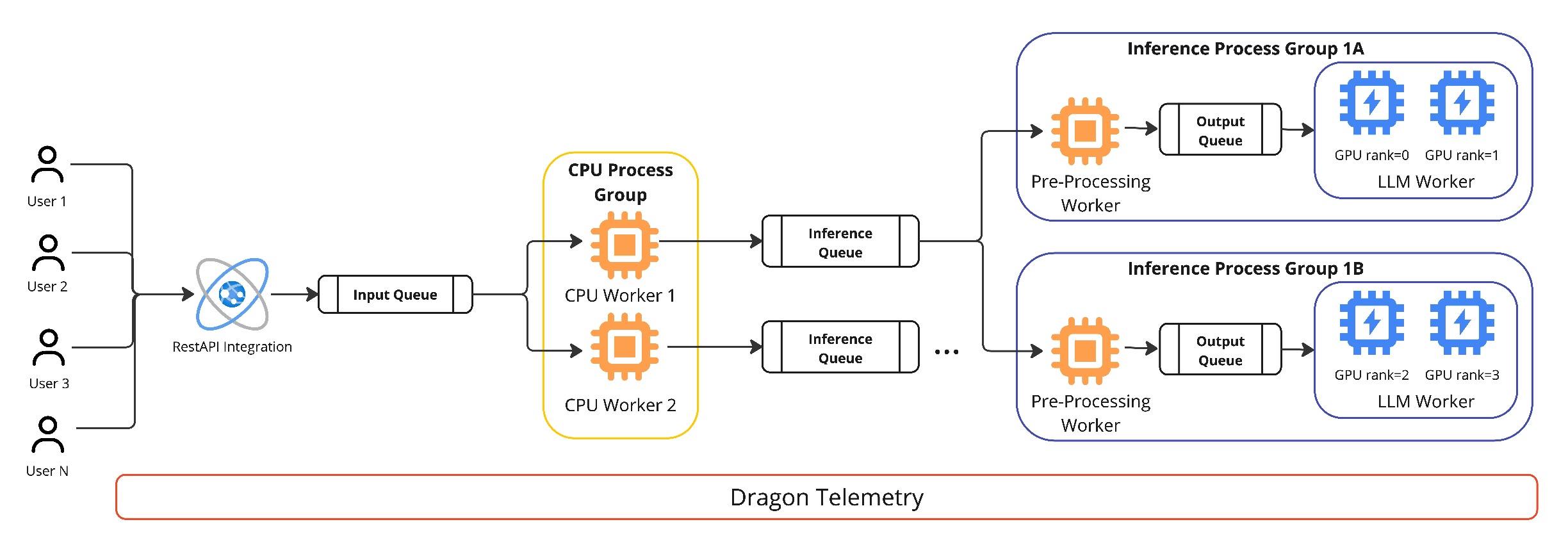
Fig. 8 Dragon inference service architecture
Fig. 8 is an example deployment shape, not a required layout. It shows many users or client applications feeding a single shared input queue, optionally through a REST API integration. Behind that queue, a Dragon CPU process group contains two CPU workers. Each CPU worker owns local inference queues and forwards requests to inference worker process groups.
The visible example shows two inference process groups, 1A and 1B.
Each process group has an optional preprocessing worker for batching and
guardrails, an output queue between preprocessing and generation, and one LLM
worker running vLLM. The LLM workers are drawn with two GPU ranks each:
1A uses GPU ranks 0 and 1, while 1B uses GPU ranks 2 and
3. That corresponds to ModelConfig.tp_size=2 because each LLM worker
uses two GPUs for tensor parallel generation. The two visible LLM workers
therefore consume four GPUs in total.
The same service scales from this example by changing configuration. Increasing
hardware.num_inf_workers_per_cpu adds more inference worker process groups
under each CPU worker. Increasing hardware.num_gpus or hardware.num_nodes
adds more available device groups. Changing model.tp_size changes how many
GPUs each LLM worker consumes; for example, tp_size=1 creates single-GPU
workers, while tp_size=4 creates workers that each span four GPUs. Dragon
handles process placement, queue communication, synchronization, telemetry, and
GPU affinity so callers can share model replicas without managing backend
worker processes directly.
What the Service Provides
The inference package in dragon.ai.inference provides:
A top-level
Inferenceobject that starts and stops the backend service.A shared
Queuerequest path. Callers submit work to one queue, and every request carries its own response queue.A preferred chat interface,
DragonQueueLLMProxy, for agent and OpenAI-style chat workloads.Streaming support via
chat_stream()for token-by-token output in interactive applications.Optional dynamic batching that groups nearby requests before a vLLM generation call.
Optional prompt guardrails based on PromptGuard.
Optional dynamic worker management that can spin extra GPU workers down after an idle period and spin them up again when request pressure rises.
Tensor-parallel vLLM workers placed with Dragon process and GPU affinity controls.
The module is experimental. APIs, configuration defaults, and the vLLM compatibility steps may change as the service matures. Currently, the service supports only vLLM-backed models. Other backends may be added in the future. Also, the service is designed for launching replicas of vLLM engines across nodes. It does not currently support multi-node tensor parallelism or pipeline parallelism for a single model instance. Each model needs to fit on the GPUs of a single node, and the service can run multiple replicas of that model across nodes. Sharding a model across multiple nodes is left for future work.
Install the Inference Dependencies
Install Dragon with the ai optional dependency set. The base Dragon package
keeps inference and agent dependencies out of the default install; the ai
extra installs the Python packages used by dragon.ai.inference and the
Dragon agent framework.
For a released Dragon package, use:
1> pip3 install "dragonhpc[ai]"
For a source checkout, install the package from src/ with the same extra:
1> pip3 install -e "src[ai]"
vLLM support is supplied by the Dragon vLLM compatibility plugin, which is
bundled inside dragonhpc and registered automatically by the ai extra.
The ai extra also installs a supported vLLM (vllm>=0.11.0,<0.20.0), so
installing the extra is all that is required:
1> pip3 install "dragonhpc[ai]"
Dragon registers its vLLM patches through vLLM’s vllm.general_plugins entry
point group, so vLLM loads them automatically when an LLM() instance starts.
The patches activate only inside the Dragon inference service and are otherwise
a no-op, so they do not affect vLLM used outside Dragon.
You also need access to the model weights. For Hugging Face-hosted models, set
HF_TOKEN in the environment used to launch Dragon. For local model paths,
pass the local path as model_name and still provide a token string because
the configuration requires one.
Start a Minimal Service
The service lifecycle is:
Create an input
Queue.Build an
InferenceConfig.Create
Inference.Call
initialize()before submitting requests.Call
destroy()during teardown.
Run programs that use Dragon native objects under Dragon, for example
dragon my_inference_app.py.
 1import os
 2
 3  from dragon.ai.inference import (
 4    BatchingConfig,
 5    DynamicWorkerConfig,
 6    GuardrailsConfig,
 7    HardwareConfig,
 8    Inference,
 9    InferenceConfig,
10    ModelConfig,
11)
12from dragon.native.queue import Queue
13
14
15inference_queue = Queue()
16response_queue = Queue()
17
18config = InferenceConfig(
19    model=ModelConfig(
20        model_name="meta-llama/Llama-3.1-8B-Instruct",
21        hf_token=os.environ["HF_TOKEN"],
22        tp_size=1,
23        max_tokens=256,
24        max_model_len=8192,
25    ),
26    hardware=HardwareConfig(num_nodes=1, num_gpus=1),
27    batching=BatchingConfig(enabled=True, batch_type="dynamic"),
28    guardrails=GuardrailsConfig(enabled=False),
29    dynamic_worker=DynamicWorkerConfig(enabled=False),
30)
31
32service = Inference(config, inference_queue)
33
34try:
35    service.initialize()
36    service.query(("Explain tensor parallelism in one paragraph.", response_queue))
37
38    result = response_queue.get()
39    print(result["assistant"])
40    print(f"end-to-end latency: {result['end_to_end_latency']} seconds")
41finally:
42    service.destroy()
43    response_queue.close()
Inference.query() is useful for plain text prompts and pre-batched prompt
lists. It places a tuple on the backend queue and expects a response dictionary
with model output and metrics. The preferred interface for agent and chat
applications is the proxy described next.
Use the Chat Proxy
DragonQueueLLMProxy gives callers an
async chat API over the same shared inference queue. Create one proxy per agent
or client process. Every chat() call borrows a private response queue from a
bounded pool, sends an
InferenceRequest, waits for the
response, and returns the assistant text.
The proxy accepts OpenAI-style messages and optional tools,
json_schema, and continue_final_message arguments. When json_schema
is provided, the backend attaches vLLM guided or structured decoding parameters
for that request.
 1schema = {
 2    "type": "object",
 3    "properties": {
 4        "summary": {"type": "string"},
 5        "risk": {"type": "string", "enum": ["low", "medium", "high"]},
 6    },
 7    "required": ["summary", "risk"],
 8}
 9
10text = await proxy.chat(
11    [{"role": "user", "content": "Summarize the deployment risk."}],
12    json_schema=schema,
13)
Use Streaming for Interactive Applications
For interactive applications that need low-latency token-by-token output,
use chat_stream(). This
async generator yields StreamChunk objects
as tokens are generated, enabling Server-Sent Events (SSE) responses and
real-time display.
 1import asyncio
 2
 3from dragon.ai.inference import DragonQueueLLMProxy, StreamChunk
 4
 5
 6async def stream_response(inference_queue):
 7    proxy = DragonQueueLLMProxy(inference_queue, max_concurrent_requests=16)
 8    try:
 9        async for chunk in proxy.chat_stream(
10            [
11                {"role": "system", "content": "You are a helpful assistant."},
12                {"role": "user", "content": "Tell me a short story."},
13            ]
14        ):
15            # Print each token as it arrives
16            print(chunk.delta_text, end="", flush=True)
17
18            # Check if generation is complete
19            if chunk.is_finished:
20                print()  # Newline at end
21                print(f"Finish reason: {chunk.finish_reason}")
22                print(f"Total tokens: {chunk.metrics.get('total_output_tokens', 0)}")
23    finally:
24        await proxy.shutdown()
25
26
27asyncio.run(stream_response(inference_queue))
Each StreamChunk contains:
delta_text: New text generated since the last chunkaccumulated_text: Full response text so faris_finished:Truewhen generation is completefinish_reason: Why generation stopped (e.g.,"stop","length")metrics: Performance metrics (only populated on the final chunk)
Streaming also supports JSON schema constraints for structured output:
 1schema = {
 2    "type": "object",
 3    "properties": {"name": {"type": "string"}, "age": {"type": "integer"}},
 4    "required": ["name", "age"],
 5}
 6
 7async for chunk in proxy.chat_stream(
 8    [{"role": "user", "content": "Generate a person profile."}],
 9    json_schema=schema,
10):
11    print(chunk.delta_text, end="", flush=True)
Note
Streaming requires vLLM 0.5.0 or newer for true token-by-token output. With older vLLM versions, the service returns the complete response as a single chunk. Streaming requests bypass dynamic batching and are processed with effective batch size of 1.
Load Configuration from YAML
The repository includes src/dragon/ai/inference/config.sample as a starting
point for YAML configuration. Programmatic configuration is often easier for
applications, but YAML is convenient for performance studies and launch scripts.
The parser validates the top-level section names and every known field name.
Unexpected keys raise ValueError so typographical errors do not silently
fall back to defaults.
Configuration Reference
Model
Field |
Default |
Meaning |
|---|---|---|
|
required |
Hugging Face model name or local model directory. |
|
required |
Hugging Face token string. Required by the config object even for local paths. |
|
required |
Tensor-parallel size. Each model worker uses this many GPUs. |
|
|
Model precision passed to vLLM. |
|
|
Maximum new tokens generated per response. |
|
|
Prompt plus output context window passed to vLLM. |
|
|
Sampling controls. |
|
|
Sampling temperature controlling randomness. |
|
|
Penalty applied to previously generated tokens to discourage repetition.
Values greater than |
|
|
If |
|
|
If |
|
|
System instructions used by the plain text |
|
|
vLLM logging level. |
|
|
Fraction of GPU memory vLLM uses for model weights and KV cache. Range
is |
Hardware
Field |
Default |
Meaning |
|---|---|---|
|
|
Number of Dragon allocation nodes to use. |
|
|
Number of GPUs per node to use. |
|
|
Number of GPU inference workers grouped under each CPU head worker.
|
|
|
First node index to use when multiple services share an allocation. |
|
|
Maximum size of the per-CPU-head inference worker input queue. |
Each inference worker receives a contiguous group of tp_size GPU devices.
For example, on one 8-GPU node with tp_size=2, Dragon can form four model
workers. When num_inf_workers_per_cpu is left at -1, the service
auto-calculates it as num_gpus // tp_size (here 8 // 2 = 4), so all four
model workers are grouped under the node’s CPU head worker.
Batching
Field |
Default |
Meaning |
|---|---|---|
|
|
Enables batching logic. |
|
|
|
|
|
Time window used by dynamic batching before flushing a partial batch. |
|
|
Maximum request count per vLLM generation call and vLLM
|
Dynamic batching is the right default for concurrent clients and agents. Pre-batching is useful for benchmark drivers and offline prompt lists where the caller already controls grouping.
Guardrails
Field |
Default |
Meaning |
|---|---|---|
|
see note |
Enables PromptGuard filtering before prompts reach vLLM. |
|
|
Hugging Face model used for jailbreak scoring. |
|
|
Prompts with a jailbreak score greater than or equal to this threshold are rejected. |
Rejected prompts receive the standard response Your input has been
categorized as malicious. Please try again. and do not reach the LLM.
Note
InferenceConfig(...) omits guardrails by default through its top-level
default factory. GuardrailsConfig() itself defaults to enabled, and the
YAML from_dict() path also defaults missing guardrails.toggle_on to
enabled. Set GuardrailsConfig(enabled=...) or
guardrails.toggle_on explicitly in production code.
Dynamic Workers
Field |
Default |
Meaning |
|---|---|---|
|
see note |
Enables worker spin-up and spin-down behavior. |
|
|
Minimum model workers that remain active under each CPU head. |
|
|
Idle time before an extra worker can spin down. |
|
|
Rolling time window used to detect request pressure. |
|
|
Request count inside the rolling window that triggers an available worker to spin up. |
Note
InferenceConfig(...) omits dynamic worker management by default through
its top-level default factory. DynamicWorkerConfig() itself defaults to
enabled, and the YAML from_dict() path also defaults missing
dynamic_inf_wrkr.toggle_on to enabled. Set this field explicitly.
Choose Resource Settings
Start from the model’s memory needs and tensor parallelism requirements:
tp_sizemust be at least1and cannot exceed the number of GPUs per node selected for the service.Each inference worker consumes
tp_sizeGPUs.The number of inference workers per node is roughly
floor(num_gpus / tp_size).num_nodes=-1andnum_gpus=-1use the whole Dragon allocation.node_offsetlets a second service start on a later node in the same allocation.
Examples:
Goal |
Settings |
Effect |
|---|---|---|
Small model on one GPU |
|
One vLLM worker on one GPU. |
Larger model across four GPUs |
|
One tensor-parallel worker using four GPUs. |
Many replicas of a smaller model |
|
Up to eight independent model workers. |
Two services in one allocation |
Service A |
Each service uses a different node slice. |
Response Shape and Metrics
The backend sends a dictionary to each response queue. The proxy normalizes that
dictionary to the assistant text, while direct query() users receive the
full dictionary:
 1{
 2    "hostname": "node001",
 3    "inf_worker_id": 1,
 4    "devices": [0, 1],
 5    "batch_size": 4,
 6    "cpu_head_network_latency": 0.01,
 7    "guardrails_inference_latency": 0.0,
 8    "guardrails_network_latency": 0,
 9    "model_inference_latency": 1.34,
10    "model_network_latency": 0.0,
11    "end_to_end_latency": 1.42,
12    "requests_per_second": 2.98,
13    "total_tokens_per_second": 740.21,
14    "total_output_tokens_per_second": 120.08,
15    "user": "Explain tensor parallelism.",
16    "assistant": "Tensor parallelism splits ...",
17}
These metrics are also recorded through Dragon telemetry from the inference worker process.
Shutdown
Always call destroy() on the service. It sets the shared end event, joins
CPU worker process groups, stops and closes the process group, and closes the
input queue. For proxies, call await proxy.shutdown() in each client
process so pooled response queues are destroyed.
1try:
2    service.initialize()
3    # submit work
4finally:
5    service.destroy()
Troubleshooting
Tensor Parallelism cannot be greater than the number of GPUsLower
tp_sizeor increasehardware.num_gpus.tp_sizeis the number of GPUs consumed by a single model worker.Unexpected keys in config.yamlThe YAML parser rejects unknown field names. Compare the section and field names with
src/dragon/ai/inference/config.sample.- Model download or authentication failures
Check
HF_TOKEN, model access permissions, and whethermodel_nameis a valid Hugging Face name or local directory.- Port collisions or distributed initialization failures
The service sets
MASTER_PORTand uses the Dragon vLLM plugin to patch open-port selection. The plugin and a supported vLLM (vllm>=0.11.0,<0.20.0) are both installed bydragonhpc[ai], so confirm theaiextra is installed in the environment used to launch Dragon.- Calls through
DragonQueueLLMProxy.chat()appear to wait max_concurrent_requestsis a hard limit on in-flight requests per proxy. Additional calls wait until a pooled response queue is released.- Guardrails reject prompts unexpectedly
Lower sensitivity only with care. A prompt is considered safe when its jailbreak score is below
prompt_guard_sensitivity.